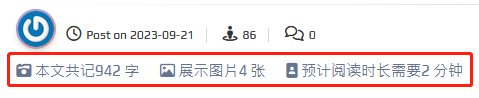
我们可以手动为博客文章添加字数、图数、阅读时长等信息,方便预估时间和阅读
先在服务器上找到 WordPress 站点目录,如笔者的是 /www/wwwroot/[站点文件名]
在目录底下找到 wp-content/themes/[WordPress使用的主题名称]/functions.php
在末尾添加以下代码:
function show_counting_info () {
global $post;
$content = $post->post_content;
preg_match_all(‘/<img.*?(?: |\\t|\\r|\\n)?src=[\'”]?(.+?)[\'”]?(?:(?: |\\t|\\r|\\n)+.*?)?>/sim’, $content, $result, PREG_PATTERN_ORDER);
$text_num = mb_strlen(preg_replace(‘/\s/’,”,html_entity_decode(strip_tags($post->post_content))),’UTF-8′);
$image_num = count($result[1]);
$read_time = ceil(($text_num+$image_num*100)/800); // 取800字/分钟,1张图算100字
$output .= ‘<i class=”fa-solid fa-camera-retro”></i> 本文共记 ‘ . $text_num . ‘ 字  <i class=”fa-regular fa-image”></i> 展示图片 ‘ . $image_num . ‘ 张 <i class=”fa-solid fa-image-portrait”></i> 预计阅读时长需要 ‘ . $read_time . ‘ 分钟’;
return $output;
}
随后即可在你想要显示文章字数、图数、阅读时长的地方添加以下代码:
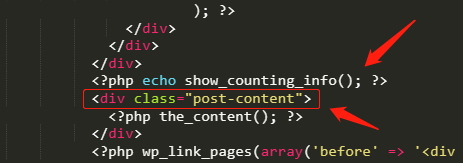
<?php echo show_counting_info(); ?>
如添加在同目录下的博客简略信息罗列展示页 content.php;
或博客文章详情页 single.php,如下图代码<div class=”post-content”>的前面: